
Most lists of educational websites for kids were written once and never opened again. Click through a few and you find a game buried under ads, a sign up screen where the lesson should be, or a site that no longer exists. Wonderopolis, which counted more than 45 million Wonder Friends, shut down for good in 2025, and its address now sends you to a goodbye note.
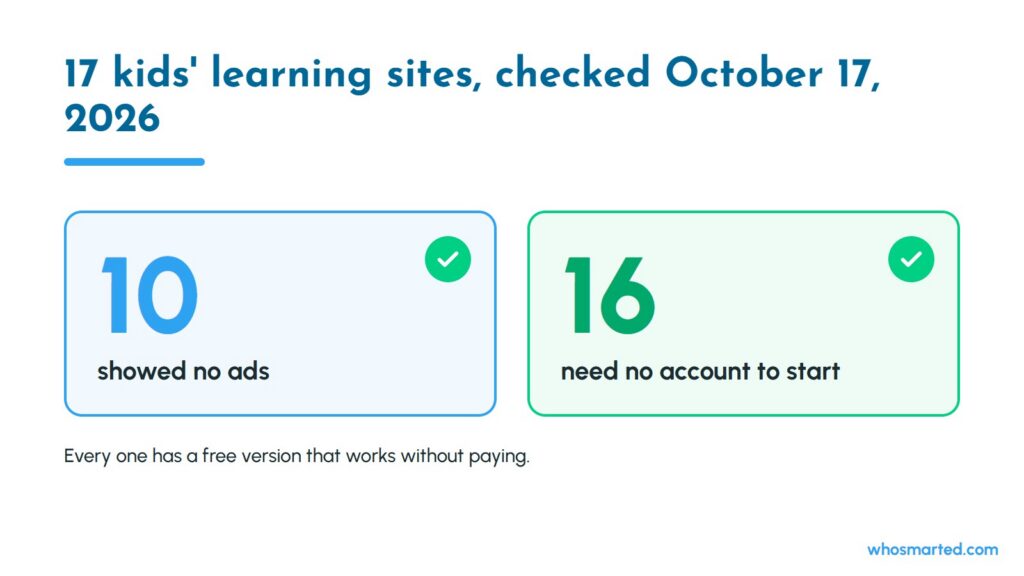
This guide comes from the team behind Who Smarted?, the educational podcast for kids, and it is built on a check you can repeat yourself. On October 17, 2026, we opened all 17 sites below in a regular browser, without signing in, and recorded three things: whether the free version actually works, whether it shows ads, and what the paid upgrade costs when there is one.
Educational websites here means both the free, ad-free sites run by nonprofits and public agencies and the free sites that pay their bills with ads or a membership. You will know which is which before your child clicks. If you are a parent looking for twenty good minutes after school, you need sites that load fast and do not upsell your kid. If you teach, you need sites that work on a school device with no ten minute login. And if you homeschool, you want depth by subject, not another flashy game.
By the end, you will have a short list for your child’s age, a clear picture of what free really means on each site, a quick way to tell real learning from busywork, and a screen-free option for the moments when your child has had enough screen.
We cover it in four parts: the full checked list, the best sites by age, how to judge any site in under a minute, and where audio learning like Who Smarted? fits. First, the list itself.
All 17 Sites at a Glance, Checked on October 17, 2026
The best educational websites for kids are PBS KIDS, Starfall and Khan Academy Kids for ages 3 to 6, ABCya, Funbrain and Storyline Online for ages 6 to 8, and NASA Space Place, National Geographic Kids, Khan Academy and Scratch for ages 8 to 12. Ten of the 17 sites showed no ads at all in our check, and every one has a free version that works without paying.
The table is our Free Means Free Ledger. “Ads” means we saw ad slots or an ad network loading on the page. “Account” means what you need before your child can actually play or read.
| Site | Our age guide | Best for | What it costs | Ads in our check | Account needed |
|---|---|---|---|---|---|
| PBS KIDS | 3 to 6 | Early reading, math and science with PBS characters | Free | None found | No |
| Starfall | 3 to 7 | Phonics and learning to read | Learn-to-Read is free; home membership $35 a year | None found | No, for the free program |
| Khan Academy Kids | 2 to 8 | Reading, math and social skills in one app | Free, no subscriptions | None, per Khan Academy | Set up the app |
| Sesame Street | 2 to 5 | First skills, songs and coloring pages | Free | None found | No |
| Toy Theater | 4 to 9 | Hands-on math tools like counters and ten frames | Free; ad-free membership $12 a month | Yes | No |
| ABCya | 4 to 11 | Learning games sorted by grade | Free; ad-free Family plan $9.99 a month or $79.99 a year | Yes | No |
| Funbrain | 4 to 13 | Games and online books, Pre-K to 8th grade | Free | Yes | No |
| Storyline Online | 4 to 9 | Picture books read aloud by actors | Free | None found | No |
| Math Playground | 5 to 11 | Math games and logic puzzles | Free; ad-free family plan $7 a month or $42 a year | Yes | No |
| NASA Space Place | 7 to 12 | Space and Earth science | Free | None found | No |
| National Geographic Kids | 6 to 12 | Animals, nature and geography | Free | Yes, labeled | No |
| OLogy | 7 to 12 | Science from the American Museum of Natural History | Free | None found | No |
| Ducksters | 8 to 13 | History, biographies and science explainers | Free | Yes | No |
| DOGOnews | 8 to 13 | Kid-friendly current events | Free to read | Yes | No, to read |
| Khan Academy | 8 and up | Math, science and more, at your child’s pace | Free, run by a nonprofit | None found | No to browse; free account saves progress |
| Scratch | 8 to 16 | Coding by making games and stories | Free | None found | Free account to save and share |
| Code.org, now called CodeAI | 5 to 12 | Coding and AI lessons | Free | None found | No for elementary lessons; older courses need one |
The age column is our own guide, built from each site’s grade levels and content. Two come from the sites themselves: Khan Academy Kids says it is for ages 2 to 8, and Scratch says it is designed for ages 8 to 16, with ScratchJr for ages 5 to 7. Prices and ads change, so treat the date on this table as part of the data.
Best Educational Websites for Preschoolers and Kindergartners, Ages 3 to 6
For ages 3 to 6, start with PBS KIDS, Starfall and Khan Academy Kids. All three are free, none showed ads in our check, and all three are built for children who cannot read instructions yet.
- PBS KIDS: games built around shows your child may already love, which lowers the barrier for a shy learner. Our check found no ad networks on the games page and no login.
- Starfall: the best pure phonics site on this list. Its nonprofit Learn-to-Read program, from ABCs through early reading, is free for every child, and the ABCs section opened with no sign in. A $35 a year home membership unlocks the full library of more than 700 activities, games and books.
- Khan Academy Kids: the most complete free option, covering reading, math and social-emotional skills. Khan Academy describes it as free with no ads and no subscriptions. It works best as an app on a tablet, which you set up once.
- Sesame Street: songs, games and printables for the youngest kids. Free, with an optional sign in for favorites.
- Toy Theater: virtual counters, ten frames and pattern blocks that make early math hands-on. It is free but shows ads, and a $12 a month membership removes them, so sit nearby with a four year old.
At this age the deciding factor is reading. If your child cannot read yet, pick sites with spoken directions, like PBS KIDS and Khan Academy Kids. If they are sounding out words, Starfall earns the most minutes, because every activity moves them toward reading on their own. Picture a four year old who taps randomly through a game with written directions: the screen time counts, the learning does not.
Some parents of five year olds would rather skip screens for learning altogether, and that is a reasonable call. If that is you, audio is the middle ground, and our guide to podcasts that work for five and six year olds covers which shows hold a kindergartner's attention.
Best Educational Websites for Early Elementary, Ages 6 to 8
For ages 6 to 8, ABCya, Funbrain and Storyline Online cover the most ground. ABCya and Funbrain sort their games by grade, and Storyline Online turns reading practice into something kids ask for.
- ABCya: learning games sorted by grade, from Pre-K through 6th grade and up. The free version runs on ads. The Family plan removes them for $9.99 a month or $79.99 a year and covers up to five devices.
- Funbrain: games, videos and online books from Pre-K through 8th grade. It is free and ad supported, with no account needed.
- Storyline Online: the SAG-AFTRA Foundation's literacy program, where well known actors read picture books aloud over the illustrations. More than 100 videos, free, and no ads in our check. Each book comes with supplemental curriculum from a credentialed elementary educator.
- Math Playground: math games and logic puzzles aimed at kindergarten through 6th grade. Free with ads, plus an ad-free family plan at $7 a month or $42 a year.
Ads matter more at this age than parents expect. A six year old cannot tell an ad from a game button, and a stray tap can drop them on a page you never meant them to see. If your child plays alone, lean on the ad-free sites in the ledger, or pay for the ad-free plan on the one site they love most. If you are in the room, the free ad supported versions are fine.
Say your seven year old loves ABCya and plays 30 minutes a day. That is about 15 hours a month on one site, which makes the $9.99 plan roughly 70 cents an hour for no ads. For a child who visits once a week, the free version is the better deal. If you want games beyond websites, our list of the best educational games for kids covers apps and consoles too.
Best Educational Websites for Kids Ages 8 to 12
For ages 8 to 12, the best sites shift from games to real subjects: NASA Space Place and OLogy for science, National Geographic Kids for animals and geography, Ducksters for history, DOGOnews for current events, and Khan Academy, Scratch and Code.org for math and coding.
- NASA Space Place: NASA's science site for kids, with games, hands-on activities and explainers on space and Earth. Free, no ads and no login.
- OLogy: the American Museum of Natural History's science site, from dinosaurs to "How much is a billion?" Free and ad-free in our check.
- National Geographic Kids: animal facts, quizzes and videos with National Geographic photography. Free, but the pages carry ad slots labeled "Advertisement." The one we saw promoted the magazine itself.
- Ducksters: clear, kid-level explainers on history, biographies, science and geography, which makes it a homework favorite. Free with ads.
- DOGOnews: short news articles for kids on science, the environment and world events. Free to read, with third-party ads in the sidebar.
- Khan Academy: free, run by a nonprofit, and strongest in math. Lessons open without an account, so a child can start in seconds. A free account saves progress.
- Scratch: MIT-born coding where kids build games and animations from blocks. Free for everyone. Kids can create without an account, but saving and sharing projects needs one.
- Code.org: the nonprofit now presents itself as CodeAI and has added AI lessons to its free coding courses. Its elementary lessons say you can explore without an account, and signing in saves progress; its middle and high school courses need an account.
Kids this age can handle a reading-heavy site, so the question becomes interest. Picture a ten year old who rolls her eyes at "learning websites" but has asked about black holes three times this week. Hand her NASA Space Place, not a math drill site, and she will read for twenty minutes without being asked. Follow the curiosity first; the skill practice can come second. For a quick warm up before she logs on, try a few of our space trivia questions together at dinner.
What Free Really Means on Kids' Learning Sites
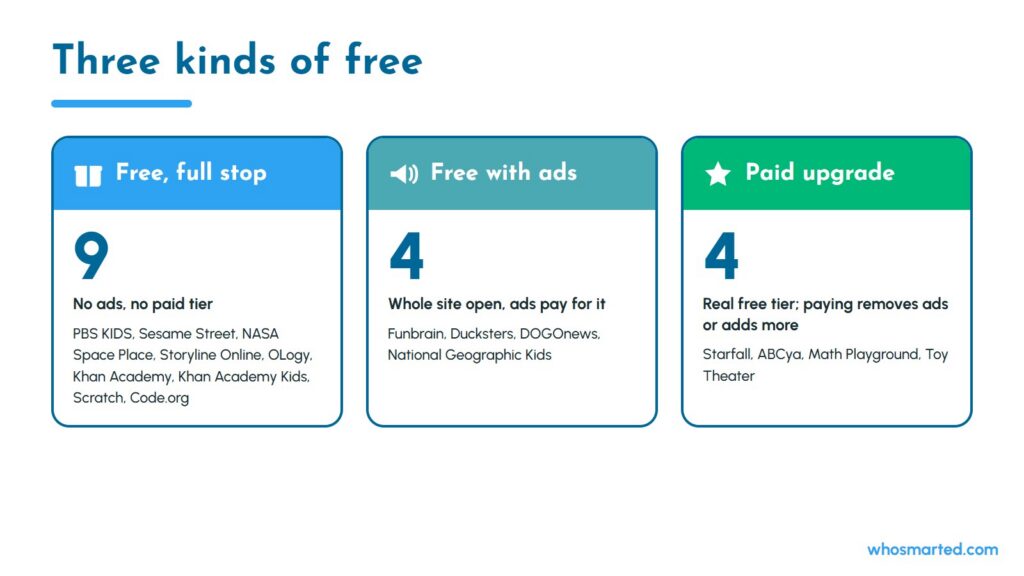
Free on a kids' learning site means one of three things, and knowing which one you are using tells you what your child will see.
- Free, full stop: PBS KIDS, Sesame Street, NASA Space Place, Storyline Online, OLogy, Khan Academy, Khan Academy Kids, Scratch and Code.org. These are run by public media, government, museums and nonprofits. No ads showed up on any of them in our check.
- Free with ads: Funbrain, Ducksters, DOGOnews and National Geographic Kids. The whole site is open, and ads pay for it.
- Free with a paid upgrade: Starfall, ABCya, Math Playground and Toy Theater. The free tier is real, and the paid tier removes ads or unlocks more activities. Starfall is the exception that stays ad-free either way; its membership adds content.
None of these are scams, and the ad supported sites keep a lot of good material free. The tradeoff is attention: ads compete with the lesson, and young kids tap them. When a child will play unsupervised, choose from the first group. When you are nearby, the second and third groups open up.
Lists also go stale. Wonderopolis had more than 2,900 Wonders of the Day when the National Center for Families Learning announced it would close on July 31, 2025. Any list that still sends you there was not checked recently, and it is worth asking what else on it has changed. For the bigger picture on keeping kids safe once they are online, see our guide to simple online safety tips.
How to Tell a Real Learning Site From Busywork
A real learning site makes your child think, explain or create. Busywork keeps them clicking. Parents who have tried a lot of platforms describe the same pattern: a site looks perfect on day one, then two weeks later the child is clicking through just to finish, or closes the tab the moment the adult leaves the room. One parent summed up the worst offenders as "colorful progress bars."
Run this four question check after your child has used a site for a week:
- Can your child tell you one thing they learned? Ask at dinner. A vague "I got points" is a warning sign.
- Do wrong answers teach or punish? Good sites show why an answer was wrong. Some parents report that drill sites which take away points for a single slip make kids anxious instead of curious.
- Does the challenge grow? If the activities are as easy on day seven as on day one, your child has outgrown the site.
- Would they choose it again? Not every learning minute has to be fun, but a site your child avoids will not get used.
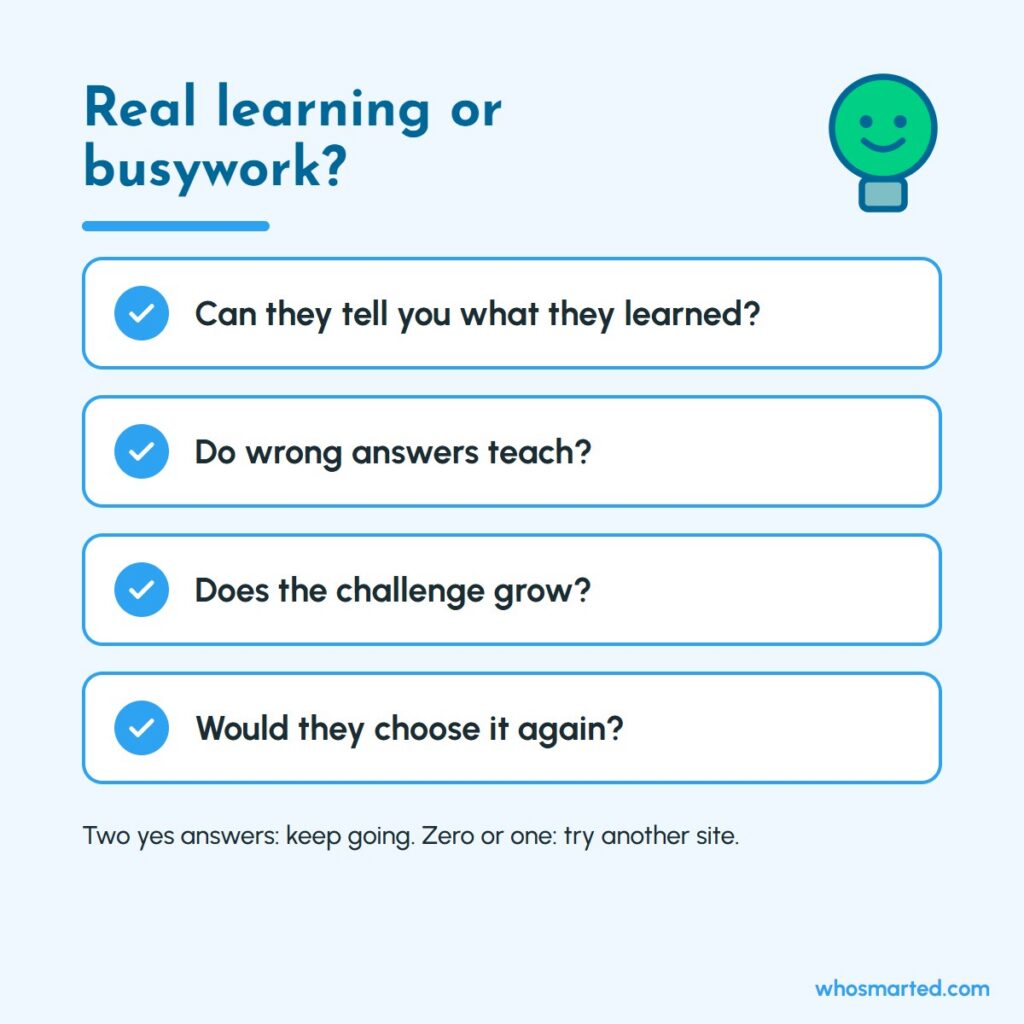
Say your eight year old scores 100 percent on a math game every day for a week. That feels like progress, but if they cannot explain how they solved the problems, the game is too easy, and Khan Academy's lessons or Math Playground's logic puzzles will push them further. Two yes answers out of four means keep going; zero or one means try another site from the ledger.
Where Who Smarted? Fits: Learning When the Screen Is Off
Who Smarted? fits in the gaps the websites cannot fill: car rides, bedtime, dinner prep and the moments when your child has had enough screen time for one day. It is a free educational podcast for kids, and every episode is one big question, like what Saturn's rings are made of or what life was like in ancient Egypt, told as a funny story with quiz breaks along the way.
It works as a website too. Whosmarted.com plays the newest episode right on the homepage, and dozens of episode pages carry the full transcript under the player, so a child who wants to read along can. As of October 5, 2026, the show had 1,154 public episodes, a median length of about 16 and a half minutes, and new episodes six days a week, measured from its own public feed. On Apple Podcasts it holds a 4.6 star rating from 4,979 ratings as of October 17, 2026.
"it teaches important things in a way I can understand"
Noah, a listener from Plano, Texas, as read on "Trusty Trivia: SPACE!!!"
The best way to use it alongside the sites above is as a pair. Your child spends fifteen minutes on a website, then hears an episode on the same subject in the car or at bedtime, when their eyes are tired but their brain is not. A NASA Space Place session pairs with our episode on what Saturn's rings are made of. A Ducksters page on Egypt pairs with what life was like in ancient Egypt. The second pass, in a different format, is what makes a fact stick.
Screen time is the reason this matters. The American Academy of Pediatrics' Family Media Plan gives families a way to plan how media is used at home, and once you have a plan, an audio option means learning does not have to stop when the tablet goes away. Ads play in the free feed; the ad-free version is Who Smarted?+, and teachers can get it free.
Best Educational Websites for Teachers and Homeschool Families
Educational websites work for every family, but teachers and homeschool families face problems at-home users do not. Before you pick, think about logins, school filters and how deep each site goes on a single subject.
For teachers who cannot lose ten minutes to logins
In a teachers' forum thread about free websites for a kindergarten classroom, one commenter put the problem plainly: a site with a ten minute login and repeated password resets is of little use with five year olds. Their picks were sites like PBS KIDS and Toy Theater that little hands can open on their own. In our ledger, 16 of the 17 sites let kids play or read with no account at all. In class, start with those, check that your district filter allows them before the lesson, and save account-based sites like Scratch for older grades. For listening time on the carpet, our classroom guide to Who Smarted? shows which episodes fit a 10 or 15 minute gap, and teachers can get the ad-free version free.
For homeschool families who want sites with no logins and real depth
A homeschool parent on a homeschool forum asked for educational websites that do not require logins, and the answers that rose to the top were museum and public sites: the Smithsonian Learning Lab, OLogy and PBS LearningMedia. That matches what the ledger shows. The nonprofit sites go deepest on one subject without upsells. Build your week by subject: NASA Space Place for science, Ducksters for history, Khan Academy for math, Storyline Online for read-alouds. Then use audio to review on the go, which our guide to fitting a podcast into your homeschool week lays out day by day.
Make Learning Stick With Who Smarted?
The right website gets your child curious; hearing the same idea again later is what helps it stay. Start with two or three sites from the ledger for your child's age, run the four question check after a week, and keep the ones that pass. When the screen goes off, listen to Who Smarted? free on the drive, at bedtime or wherever your family's questions come up next.