Children use the Internet for all sorts of things: studying, relaxing, communicating with friends. That’s why adults must not forget about the risks of the digital environment for minors. Dangerous content, fraud, or cyberbullying create real threats that can affect the entire family. This is why online safety for kids requires establishing clear rules. Parents do not need much time for this process. Sometimes a five-minute conversation per day and basic gadget settings are enough to seriously reduce digital risks.
How Online Safety for Kids Starts with Clear Everyday Family Rules
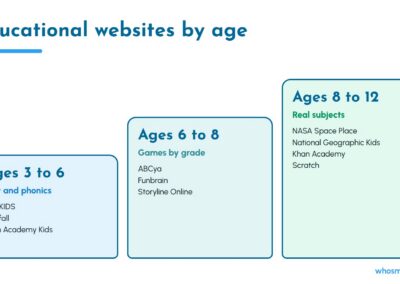
First, the family agrees on rules for using the Internet. Base restrictions on your child’s age. For a preschooler strict parental controls and active supervision are essential. Without an adult’s presence the kid should only be able to access approved educational apps. Elementary students need clear daily time limits and guided browsing to ensure they only visit safe, curated websites. With teenagers, meanwhile, collaborative rulemaking works best.
Here are some basic rules for online safety for kids:
- All apps, games, and sites the minor visits must be age-appropriate.
- Kids should avoid sharing sensitive information online: home address, the name of their school, parents’ workplaces.
- When a kid receives a message that looks suspicious or feels threatened in a digital space, they should speak to a trusted adult.
- Everyone agrees to avoid opening unknown links or downloading files from unsafe sources.
- The family agrees in advance on how much time the child can spend online.
Rules start working only when the child genuinely accepts them. Once kids understand that every post leaves a permanent trace, they think twice before posting. Cyber safety for kids is built precisely on this understanding of the long-term consequences of digital actions.
Parental Controls and Device Settings That Support Safer Daily Browsing
Modern devices help organize online safety for kids without constant total monitoring. There are parental control apps you can use to limit access to dangerous apps and manage schedules. When choosing a specific solution, parents carefully study all technical characteristics.
Here are a few good tools for families:
- Apple Screen Time helps manage access to programs and restrict content, also allowing control over screen time limits on compatible devices.
- Google Family Link allows setting restrictions for Android-based gadgets and monitoring the schoolchild’s activity.
- Microsoft Family Safety manages screen time, content filters, and app limits on Windows, Xbox, and Android.
Do not forget about safe search filters if such an option is available in the used search engine. This solution reduces the risk of finding inappropriate content. For maximum effectiveness, it is also necessary to check privacy settings on tablets, limiting program access to the camera, contacts, microphone, and geolocation.
Cyber Safety for Kids During Online Games, Chats, and Digital Group Play
Online games help develop reaction, imagination, and healthy communication skills. But games also come with online gaming chat risks: bullying, insults, and scams.
Cyber safety for kids assumes that the minor knows how to recognize such situations. The schoolchild must understand that the friendly behavior of an interlocutor and an interesting avatar do not guarantee the absence of threats. Parents pay special attention to the phenomenon of stranger danger online. A stranger rarely starts a conversation with suspicious questions. Often, a person communicates for a long time first, and then asks to switch to another messenger, keep the correspondence secret, or share photos.
Therefore, parents establish a number of strict rules:
- Communication occurs primarily in game chats with those whom the schoolchild knows in real life.
- Adults prohibit any meetings with acquaintances from the Internet without prior notification.
- The minor categorically does not disclose personal data.
- Offensive behavior is met with a block and a complaint to the game administrator or moderator.
- Any requests to send personal photos or hide correspondence are something the child needs to share with the parents.
Most modern games have settings for disabling voice communication. You can also block messages and friend requests from strangers. Details depend on the platform, but basic online safety for kids means turning these settings on.
Cybersecurity for Kids: Protecting Personal Data and Secure Family Accounts
Children rarely understand how easy it is to reveal personal information. Even a seemingly harmless publication is enough for this. For example, a school uniform is often visible in a photo, which allows identifying the educational institution. Through basic profile data, attackers easily track other accounts and collect many sensitive details. This is why cybersecurity for kids should include basic knowledge about privacy, passwords, and suspicious messages.
Phishing messages deserve special attention. These are manipulative mailings urging users to follow an unverified link or give out a password. Schoolchildren often become victims of emails offering to quickly claim a prize in a game. To keep online safety for kids at a high level, adults regularly discuss such cases with children.
Accounts are also often stolen on the Internet. To avoid this, the family takes into account the following facts:
- Complex and unique passwords are a must. Cybersecurity experts note that creating strong family passwords reduces the risk of unauthorized access to accounts.
- Vary your passwords across accounts, never using the exact same one twice.
- Enable two-factor authentication on every resource that offers the option.
Spending a few minutes a day analyzing potentially suspicious messages from the Internet yields excellent results. Parents explain in detail what exactly indicates potential deception. Thanks to this, online safety for kids works even when the minor is left one-on-one with a difficult situation in digital space.
Home Wi-Fi Security and Essential Privacy Settings for a Modern Family
Child safety largely depends on the home network. Home Wi-Fi security helps protect phones, computers, tablets, and other devices from frequently encountered threats.
Here’s a list of recommendations for home router security:
- Swap the standard administrator password for a unique one.
- Install updates to the router firmware as soon as the manufacturer makes one available.
- Create a reliable and unique access key for the home network.
- Check the list of connected devices from time to time and disable unnecessary functions.
For another layer of safety, it may be a good idea to buy proxy server access from a reliable provider. Here’s how it works: the IP you’re issued acts as an intermediary in transmitting network requests and often helps preserve traffic confidentiality. However, a proxy itself does not replace encryption, gadget updates, or a parental control system. Protection capabilities depend on the specific technology and configuration.
Final Tips for Making Online Safety for Kids a Consistent Everyday Habit
No device setting can prevent all possible problems. Therefore, to ensure online safety for kids, adults must communicate regularly, be constantly nearby, and offer help. The parents’ main task is not to remove the Internet from their son’s or daughter’s life completely, but to teach minors the conscious use of modern digital technologies. Constant support guarantees that online safety for kids will remain a reliable foundation for the healthy development of the child in the digital era.